Everything a property preservation vendor needs to know about processing work orders accurately, quickly, and profitably — from initial secures to complex maintenance bids — in today’s fast-changing REO market.
| 2026 Market Signal | What It Means For The Vendors |
| Foreclosure filings up ~11% YoY (Jan 2026) | More work orders entering the pipeline — capacity pressure is rising |
| REO repossessions up ~48–52% YoY (early 2026) | Greater demand for accurate, fast work order processing |
| 11 consecutive months of rising foreclosure activity | Steady, long-term volume increase — not a short-term spike |
| REO count up ~22-24% YoY (late 2025–early 2026) | Servicers need reliable processing partners now more than ever |
Why Work Order Processing Is the Foundation of Your Property Preservation Business
If you have been in the property preservation industry for any length of time, you already know this truth: you can have the best field crews in the country, but if your work orders are processed inaccurately, submitted late, or missing critical documentation, you will lose money. Fast.
Work orders are not just administrative paperwork. They are the legal and financial backbone of everything you do in the field. Every photo you upload, every bid you submit, every line you enter into MCS Vendor360, PPW, or Pruvan — it all feeds directly into whether you get paid, whether you face chargebacks, and whether your national client renews your contract.
And in 2026, the stakes are higher than they have been in years. Foreclosure activity has climbed for twelve consecutive months. REO repossessions were up nearly 59% year-over-year in early 2026. The pipeline is filling — and vendors who cannot process volume accurately and quickly will either leave money on the table or leave the industry entirely.
At AssetSure Processing, we have been in the trenches of property preservation work order processing since 2013. This guide reflects over a decade of real-world experience across platforms including MCS Vendor360, PPW, Pruvan, and ServiceBench — not theory, not recycled content from elsewhere. This is what actually works.
Whether you are just getting started or running a regional operation with hundreds of active work orders, this guide will give you a complete, practical understanding of how work order processing works, what the most common (and costly) mistakes are, and how the industry’s leading vendors stay efficient as volume grows.
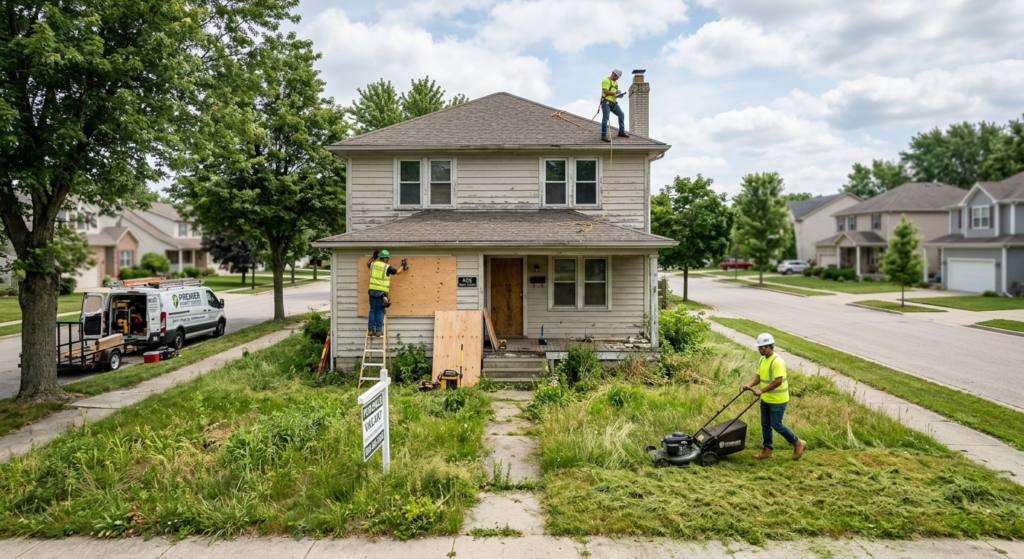
What Is Property Preservation Work Order Processing? A Complete Definition
Work order processing in the property preservation industry refers to the end-to-end administrative workflow of receiving, reviewing, completing, documenting, and submitting a work order through a national or regional client platform — from the moment it is assigned to your company to the moment it is marked complete and sent for payment.
It sounds simple. It is not.
A single work order can require you to:
• Download photos from the field via Pruvan, FTP, or email and organize them in a specific Before / During / After sequence
• Label every photo accurately according to the national client’s exact photo guidelines
• Create itemized bids using cost estimator tools like RepairBASE or XactPRM
• Input measurements, property condition notes, and scope-of-work details into the client portal
• Submit the order within a strict deadline — often 24 to 48 hours from completion
• Follow up on bid denials, clarify reopens, and re-submit corrected documentation
• Maintain a complete audit trail in case of a future chargeback dispute
For a small vendor handling five to fifteen orders per week, this is manageable — with difficulty. For a regional vendor managing hundreds of active orders across multiple nationals simultaneously, doing this in-house without a dedicated, experienced processing team is simply not sustainable.
The Two Sides of Work Order Processing
Most people think of work order processing as a single task. In practice, it breaks into two distinct disciplines:
1. Routine / Allowable Processing — These are the standard work orders that fall within your national client’s pre-set pricing guidelines (“allowables”). Grass cuts, lock changes, winterizations, initial secures, debris removal, monthly maintenance visits. These are high-volume, time-sensitive, and require speed and consistency above all else.
2. Bid-Based / Complex Processing — These are orders where the scope or cost exceeds the allowable, requiring you to create an itemized bid and obtain approval before proceeding. Roof damage, mold remediation, water intrusion, structural repairs. These require deep knowledge of cost estimating tools, precise measurement documentation, and compelling written justification — because a poorly written bid is a denied bid.
The best property preservation operations handle both with equal precision. That is what separates vendors who grow from vendors who struggle.
The Anatomy of a Work Order: What You Need to Understand Before You Touch a Portal
Before your processor touches a single platform, they need to understand what a work order actually contains and what each element means. Misreading a work order is one of the most expensive mistakes in this industry.
Core Elements of Every Work Order
| Work Order Element | What You Need to Know |
|---|---|
| Property Address | Always verify. GPS is not always accurate on vacant/foreclosed properties. Cross-reference with street signage photos. |
| Assigned Client / National | Determines which platform you use, which pricing guidelines apply, and which photo format is required. |
| Order Type | Initial Secure, Recurring Maintenance, REO, Conveyance, Grass, Winterization, Snow Removal, Hazard/Damage, etc. |
| Allowable Amount | The maximum pre-approved spend. If your cost exceeds this, you must bid. Never exceed the allowable without approval. |
| Due Date / Timeline | Hard deadlines. Missing a conveyance deadline can mean you cannot claim preservation expenses for that property. |
| Scope of Work | Specific instructions from the national. Read carefully — boilerplate language often contains critical action items. |
| Bid After the Fact (BATF) | Some nationals allow you to complete work first and invoice later. But photos must fully justify the amount. |
| Rush Order / Flag | Indicates a faster turnaround is required. These take absolute priority in your processing queue. |
Pro Tip from 13 Years in the Field: Pay close attention to the word “allowable” in every work order. It is not just a pricing note — it is a contractual cap. Going over the allowable without a written, approved bid is one of the single most common causes of chargebacks and payment disputes in the industry.
Common Work Order Types: What They Are and How They Differ
Initial Secure Work Orders
The Initial Secure is typically the most complex single work order you will ever process for a property. It is the first time you are officially taking control of a newly assigned foreclosed or vacant property on behalf of your national client — and you are expected to document everything.
An Initial Secure typically requires:
• Full exterior and interior photo documentation (all four sides, every room, every visible defect)
• Lock change to the client’s specified lockbox code and hardware requirements
• Debris removal from interior and exterior if within allowable
• Winterization if weather conditions require it and the season applies
• Initial lawn maintenance if within allowable
• Board-ups for broken windows, unsecured doors, or open entry points
• Bid submissions for anything that exceeds allowables — including any damages observed
• Full documentation of any occupied or squatter conditions, with specific notification protocols
The Initial Secure sets the tone for the entire property’s preservation lifecycle. Poor documentation here — missing photos, incomplete bids, skipped scope items — creates problems for every subsequent order on that property.
Recurring Maintenance Work Orders
These are ongoing orders assigned on a monthly or as-needed basis to keep the property maintained. Grass cuts, snow removal, monthly property inspections, hazard checks. They are high in volume and low in complexity — but require speed and consistency. A missed re-cut or late snow removal order at a property with an active violation notice can result in significant financial liability for both you and your client.
Conveyance Condition Work Orders
These are among the most financially significant orders in the industry. A Conveyance Condition Work Order instructs you to bring the property up to the standards required by HUD for the lender to transfer it back. If you miss a timeline or a material item on a conveyance order, HUD may classify it as Mortgagee Neglect — meaning the vendor, not the bank, bears the cost of any outstanding work required for conveyance. These orders demand meticulous documentation and zero tolerance for error.
Hazard and Damage Orders
These arrive when a property sustains damage — roof leaks, fire, flooding, vandalism, mold. They require you to assess and document the damage, then create detailed, itemized bids for remediation. The quality of your bid narrative — explaining what caused the damage, what needs to be done, and why — directly determines your bid approval rate.
Platform-by-Platform Guide: Processing Work Orders on MCS, PPW, Pruvan, and ServiceBench
The property preservation industry runs on a handful of major platforms. Each has its own interface, its own photo requirements, its own bid submission process, and its own quirks. Knowing them well is not optional — it is the difference between efficient processing and constant errors.
MCS Vendor360
MCS Vendor360 is one of the most widely used platforms in the industry, powering work order management for Mortgage Contracting Services — one of the largest national property preservation companies in the United States. Vendor360 handles everything from order assignment and photo uploads to bid submission and payment.
Key things to know when processing MCS orders:
• Photo uploads must follow MCS’s specific labeling and sequencing conventions — Before / During / After must be clearly distinguished and in chronological order
• Bid submissions inside Vendor360 require accurate line-item descriptions aligned with MCS pricing guidelines — vague descriptions lead to immediate denials
• Reopens and denial responses must be addressed within MCS’s defined response window or the order may be closed out against you• Maintenance orders on MCS carry strict turnaround expectations — 24-hour completion is standard for many order types
PPW (Property Preservation Wizard)
PPW is a widely used processing and management platform that many regional and independent preservation companies rely on to manage their order workflow. It functions as an operational hub — connecting field crews, processors, and clients within one system. PPW is particularly useful for vendors who manage sub-contractors, as it allows order delegation, photo review, and bid management from a centralized dashboard.
Key things to know when processing through PPW:
• PPW integrates with multiple national platforms, meaning an order assigned through Safeguard, Cyprexx, or others can be managed inside PPW — but submissions still go through the national’s own portal
• Photo organization is critical in PPW — the platform surfaces photos in the order they are uploaded, so batch uploads need to be pre-sorted before entry
• The bid creation interface in PPW is powerful but requires consistent application of cost estimating standards — teams need clear SOPs for bid language and line-item formatting
Pruvan
Pruvan is primarily a mobile field reporting platform used by vendors and inspectors to capture and submit work order documentation directly from the field. It is particularly strong for photo capture, geo-tagging, and real-time order updates. Many nationals have integrated Pruvan into their workflow, and some require all field documentation to flow through Pruvan before processing.
Key things to know when processing Pruvan-based orders:
• Photos submitted through Pruvan are geo-tagged and time-stamped, which provides a strong audit trail but also means any discrepancy between submission time and actual visit time will be flagged
• Pruvan’s mobile interface is designed for field use — but processors reviewing submissions in the back-office must validate that all photos are properly labeled and complete before forwarding to the national• Pruvan integrates with several national systems, reducing double-entry — but the integration must be configured correctly or orders can fall through the cracks
ServiceBench
ServiceBench is used by several major property management and field service companies as a work order management and dispatch platform. It is highly configurable and is often used by mid-to-large regional operators who manage significant order volume. ServiceBench orders typically require strict adherence to completion codes and status updates, and the platform has a detailed audit log that servicers use to track vendor performance.
AssetSure Processing works with all of these platforms and more — including Safeguard, Cyprexx, Five Brothers, NFN, NFR, MSI, Altisource, Carrington, and others. Our processors are not generalists. They are platform-specific specialists trained on the exact requirements of each national, which is why our bid approval rates and chargeback rates consistently outperform industry averages.
Photo Documentation: The One Area Where Most Vendors Lose Money Without Realizing It
If work orders are the foundation of your business, photos are the walls. Everything else — your bids, your invoices, your chargeback disputes — stands or falls on the quality and completeness of your photo documentation.
Yet photo documentation is where the majority of avoidable errors occur. Not because vendors are careless. But because taking the right photos, in the right order, with the right labels, while in the field, under time pressure, at a distressed property that may have safety hazards — is genuinely hard.
The Before / During / After Standard
Every national has some variation of this standard, and it exists for a critical reason: it tells the story of the property to a reviewer who has never visited it and never will. Your photos are the only way a servicer, asset manager, or compliance reviewer can verify that the work was done correctly.
1. Before Photos — Taken before any work begins. Capture the full exterior (all four sides), street sign and house number, and every interior condition that requires action. These establish the baseline condition and justify every bid you submit.
2. During Photos — Taken while work is in progress. These are especially important for debris removal, repairs, and any scope items that will not be visible after completion. “During” is your protection against disputes over what was actually done.3. After Photos — Taken after all work is complete. These must mirror the before photos — same angles, same areas — to show the completed scope. Missing an “after” for an item you billed for is an immediate red flag for reviewers.
Photo Labeling and Sequencing
Every national has its own labeling requirements, and they are not suggestions — they are compliance requirements. Common labeling conventions include:
• Room-by-room interior labels: “Kitchen — Before”, “Master Bedroom — After”
• Bid-specific labels: “Roof Damage — NW Corner — Before Repair”
• Exterior orientation labels: “Front Elevation”, “Rear Elevation”, “Left Elevation”, “Right Elevation”
• Address verification: street sign and property address number are typically required as the first photos in every order
A word on photo quantity: More is almost always better. In a chargeback dispute, a photo that was not submitted cannot be produced later. In a bid review, photos that clearly show the scope and severity of the damage are often the difference between approval and denial. Train your field crews to over-document, and train your processors to verify completeness before submission.
Bid Creation and Submission: The Skill That Determines Your Profit Margins
Bid processing is where the money is made or lost in property preservation. A well-written, properly documented bid on a complex repair order can mean several thousand dollars of revenue for your company. A poorly written bid — or worse, a bid that was never submitted when it should have been — means that revenue disappears entirely.
When Do You Need to Bid?
As a general rule, you need to submit a bid whenever:
• The cost of work will exceed the allowable amount specified in the work order
• The scope of work includes damage or conditions not covered by standard allowables
• You are working on a Conveyance Condition order and items need to be brought to HUD standard beyond what is pre-authorized
• The national explicitly requests a bid as part of the Initial Secure documentation
• You encounter conditions during the initial inspection that indicate additional work will be required
The Anatomy of a Winning Bid
Bids that get approved share a consistent set of characteristics. Bids that get denied — or approved at a reduced amount — typically fail on one or more of these dimensions:
| Bid Component | What Makes It Strong vs. Weak |
|---|---|
| Measurements | Precise, specific dimensions (e.g., “Roof damage: 4ft x 12ft section, NW corner”) vs. vague estimates (“large roof hole”) |
| Photos | Multiple clear before photos at multiple angles, with close-up detail shots of the specific damage area |
| Cause Statement | Specific explanation of what caused the damage (“water intrusion from failed flashing”) vs. general notes |
| Scope Description | Step-by-step itemized repair scope (materials, labor, process) vs. a single-line summary |
| Cost Breakdown | Line-item pricing from RepairBASE or XactPRM, tied to specific tasks vs. a lump-sum figure |
| Urgency / Risk Justification | Explanation of why the repair is time-sensitive (e.g., mold growth risk, further structural damage) — critical for complex bids |
Cost Estimating Tools: RepairBASE and XactPRM
The two primary cost estimating tools used in the property preservation industry are RepairBASE (from Bluebook) and XactPRM (from Xactware). Both tools generate localized, market-adjusted cost estimates for repair tasks — and using them is not optional for most nationals. Here is what you need to know:
RepairBASE
Widely used for standard property preservation bid work. Provides line-item estimates with material and labor costs adjusted for the property’s zip code. Particularly strong for maintenance-type repairs, landscaping, boarding, and routine restoration tasks.
XactPRM
More common in complex damage and insurance-adjacent bids. XactPRM is the property preservation-focused version of Xactware’s estimating system, commonly used by adjusters. It is the preferred tool when dealing with structural damage, significant water intrusion, mold, or fire damage.
Your processors need to know which tool is preferred by each of your national clients — some nationals specify RepairBASE, some accept either, and some have their own internal pricing schedules that override both.
Bid After the Fact (BATF): Opportunity and Risk
Some nationals allow or require you to complete work first and submit the invoice afterward — this is called a Bid After the Fact (BATF). BATF orders can be lucrative because there is less back-and-forth on bid approval. But they carry a significant risk: if your photos and documentation cannot justify the amount invoiced, the national will either reduce payment or dispute the charge entirely. When working BATF orders, your field crews must document even more thoroughly than usual — because the invoice comes after, and photos are the only contemporaneous evidence you have.
The 7 Most Costly Work Order Processing Mistakes — And How to Avoid Every One
After more than thirteen years of processing work orders for vendors across the United States, we have seen every possible error. Here are the ones that cost vendors the most money, most consistently:
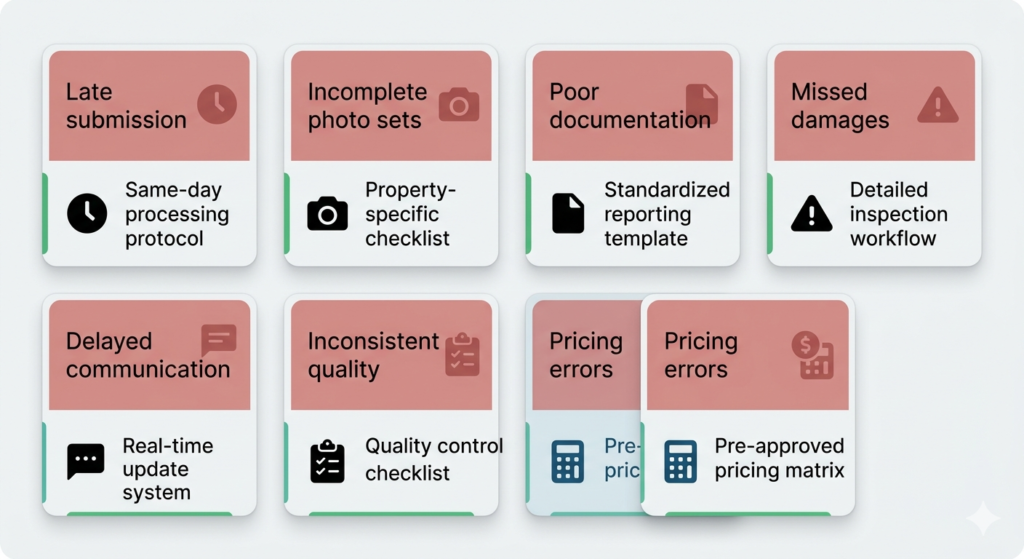
Mistake 1: Late Submission
Every work order has a due date. In property preservation, these are not soft deadlines — they are contractual commitments. Missing a submission deadline can result in the order being reassigned, payment being reduced or denied, or — in the case of conveyance orders — the vendor absorbing the cost of work that cannot be billed because the timeline was missed.
Solution: Build a same-day processing protocol for all completed orders. If an order is completed on a Tuesday, it should be processed and submitted by end of business Tuesday. For rush orders, within hours.
Mistake 2: Incomplete Photo Sets
Missing a before photo for a bid item. Forgetting an after photo for completed work. Uploading photos that are blurry, poorly lit, or do not clearly show the item in question. Any of these create problems — from bid denial to chargeback.
Solution: Create a property-specific photo checklist for every order type and verify completion before upload. Train field crews with a standard photo protocol that mirrors each national’s specific requirements.
Mistake 3: Vague or Incomplete Bid Narratives
Submitting a bid that says “roof repair needed — $2,400” without measurements, photos, cause explanation, and itemized scope is almost guaranteed to be denied or significantly reduced.
Solution: Standardize bid narrative templates for common damage types. Every bid should follow: Cause Statement → Measurement Documentation → Itemized Scope → Cost Estimate Source → Urgency Justification.
Mistake 4: Exceeding Allowables Without a Bid
Going over the allowable without prior written approval — even if the work genuinely needed to be done — puts the vendor at serious risk of non-payment. Nationals are not legally required to pay for unauthorized work.
Solution: Before beginning any work that may exceed allowables, submit a bid first. If the situation is genuinely urgent, document that urgency thoroughly and notify your client contact immediately.
Mistake 5: Ignoring Reopens and Denials
A denied bid or a reopened order is not the end of the road — it is an opportunity to provide additional documentation and secure approval. Vendors who ignore denials or let reopens expire leave significant revenue uncollected.
Solution: Assign explicit responsibility for monitoring and responding to denials and reopens within the response window. Build a tracking system that flags any open denial or reopen immediately.
Mistake 6: Platform-Specific Non-Compliance
Each national has its own labeling conventions, file size limits, photo count requirements, and bid format preferences. What works on Safeguard may not work on MCS. Submitting orders using the wrong format wastes time and creates avoidable errors.
Solution: Maintain separate Standard Operating Procedures (SOPs) for every national platform you work with. Update them whenever platforms push changes — which happens frequently.
Mistake 7: No Audit Trail for Disputes
When a chargeback arrives weeks or months after a completed order, vendors who did not maintain complete documentation have very little recourse. The chargeback stands.
Solution: Archive every completed order with its full photo set, submission confirmation, bid approval emails, and any correspondence. Cloud-based storage organized by property address and order number is the industry standard.
In-House vs. Outsourced Processing: An Honest Assessment for Growing Vendors
At some point, every growing property preservation company faces the same decision: do we keep processing in-house, or do we bring in a specialized partner? There is no universal answer. But there is a framework for thinking about it honestly.
| Factor | In-House Processing | Outsourced Processing |
|---|---|---|
| Cost Structure | Fixed overhead: salary, benefits, training, turnover | Variable: scales with order volume, no fixed headcount cost |
| Platform Expertise | Must be trained and maintained internally — staff turnover resets the clock | Specialist teams with deep experience across all major platforms |
| Turnaround Time | Dependent on staff availability and working hours | Typically 24/7 availability with dedicated order queues |
| Scalability | Adding volume requires adding headcount — lead time of weeks to months | Volume can scale up or down without operational disruption |
| Error Rate | Higher during staff transitions, onboarding periods, or high-volume surges | Consistent SOPs and QC processes maintain accuracy across volume |
| Your Time | Significant management overhead for processors, QC, and corrections | Frees principal to focus on field operations, client relationships, growth |
For vendors processing fewer than 30–40 orders per week, in-house processing is often viable if you have a reliable, trained processor. Above that threshold — or during growth phases, seasonal peaks, or any time you are onboarding with a new national — the case for outsourcing becomes compelling.
A note on offshore processing partners: The question vendors often ask is whether an offshore team can genuinely understand the nuances of U.S. property preservation. The answer depends entirely on the partner. At AssetSure Processing, our team has been exclusively focused on U.S. property preservation since 2013. We do not process anything else. Our processors know HUD guidelines, national client requirements, and platform-specific protocols as well as any in-house U.S.-based team — often better, because it is the only thing we do.
Building a Work Order Processing System That Scales: SOPs, QC, and Turnaround
Whether you process in-house or work with a partner, the vendors who consistently outperform their peers have one thing in common: they run their processing like a system, not a series of individual decisions.
Standard Operating Procedures (SOPs) by National
Every national platform has different requirements. Your SOPs need to reflect this. At minimum, you need documented procedures for:
• Photo naming, sequencing, and labeling conventions for each national
• Bid narrative templates for common damage types
• Allowable reference sheets for each national, kept current
• Escalation protocols for orders that require urgent attention or supervisor review
• Denial and reopen response processes, including response window tracking
Quality Control: Two-Layer Review
The most effective processing operations use a two-layer QC model:
Layer 1 — Processor Self-Review: Before submitting any order, the processor verifies completeness against the order checklist. All photos present? Bid narratives complete? Measurements documented? Due date confirmed?
Layer 2 — Independent QC Review: A second pair of eyes reviews the completed order before it hits the portal. This reviewer is not the processor — they are specifically looking for what was missed.
This two-layer approach adds time to processing but dramatically reduces the chargeback rate and bid denial rate — both of which cost far more time and money to recover from than the QC step itself.
Turnaround Time Standards
Industry best practice for turnaround times by order type:
• Initial Secures: same business day from field completion, or within 24 hours maximum
• Routine Maintenance / Grass / Snow: within 24 hours of completion confirmation
• Bids and Complex Orders: within 24–48 hours, with client notification if longer is needed
• Denial Responses / Reopens: within the national’s specified response window — usually 48–72 hours
• Rush Orders: within 4–6 hours of field completion, priority queue
The 2026 Property Preservation Landscape: What Rising Foreclosure Volume Means for Vendors
The market context in which you are operating in 2026 is significantly different from the past several years. For much of 2020–2023, pandemic-era forbearance programs and moratoriums kept foreclosure volume artificially suppressed. Those protections have now fully expired.
What the data shows as of early 2026:
• Foreclosure filings increased approximately 11% year-over-year in January 2026 — the twelfth consecutive month of annual growth
• More than 40,602 properties recorded foreclosure filings in January 2026 alone — a 11% annual increase
• Completed foreclosures — properties transitioning into lender ownership — rose approximately 48-52% year-over-year in early 2026
• The REO count increased approximately 22-24% year-over-year from late 2025 into early 2026
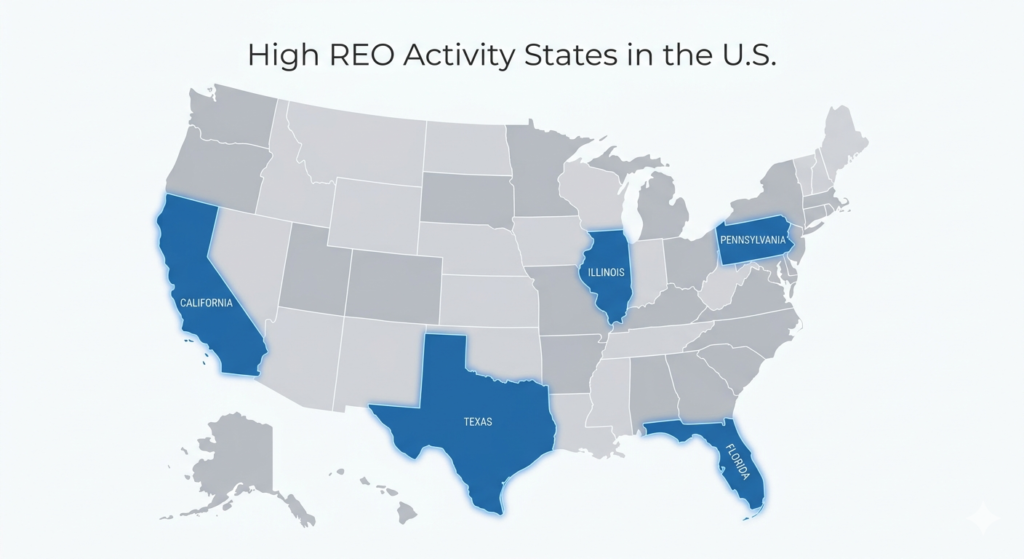
• States with the highest REO activity include Texas, California, Florida, Pennsylvania, and Illinois
This matters for vendors for several interconnected reasons. First, more REO properties in the pipeline means more work orders. The vendors who are positioned to handle increased volume accurately — without their quality declining as their quantity grows — will capture an outsized share of that market.
Second, the properties entering the pipeline in 2026 tend to be more challenging than those from previous cycles. Properties that sold at auction or were handled through loss mitigation typically stay out of the REO pipeline. What remains — and what is being assigned to preservation vendors today — is often in worse condition, in more remote locations, and with more complex remediation requirements. That means more bids, more documentation, and more processing complexity per property.
Third, the industry is still absorbing the effects of a years-long vendor exodus. As MCS noted, many vendors left the space entirely after 2020, when low volume and stagnant pricing made preservation uneconomical for them. That reduced supply of vendors, combined with rising demand from increasing REO volume, creates real capacity pressure — and real opportunity for vendors who can scale.
The bottom line: 2026 is shaping up to be one of the most significant growth years for property preservation vendors in recent memory. But growth only translates to profit if your processing infrastructure can handle the volume without sacrificing accuracy. That is the challenge — and the opportunity — in front of every serious vendor right now.
FAQ: Property Preservation Work Order Processing
How long should a typical work order take to process?
For routine orders — grass, lock changes, simple maintenance — an experienced processor should complete processing in 30 to 60 minutes. Complex orders with multiple bids, extensive photo documentation, or unusual scope items can take 2 to 4 hours. Initial Secures on significantly damaged properties can take longer, depending on the volume of documentation.
What is the most common reason bids get denied?
Insufficient documentation is by far the most common cause of bid denial. Specifically: photos that do not clearly show the damage, measurements that are missing or imprecise, and bid narratives that do not explain the cause, scope, and necessity of the repair. A denied bid is rarely about the dollar amount — it is almost always about the quality of the documentation supporting that amount.
How do I reduce chargebacks in my property preservation business?
The most effective chargeback prevention strategies are: maintaining complete before/after photo documentation for every order, never exceeding allowables without written approval, submitting orders within the required timeframe, and maintaining a searchable archive of all completed orders with their documentation. When a chargeback arrives, your ability to dispute it depends entirely on what documentation you retained.
Is outsourcing work order processing right for my company?
It depends on your volume, your growth trajectory, and how much time you are personally spending on processing versus field operations and business development. If processing is consuming more than 30% of your operational capacity and limiting your ability to take on new work, outsourcing is almost certainly the right move. The key is choosing a partner with genuine, deep experience in the industry — not a generic data entry service.
What platforms should my processing team know?
At minimum: MCS Vendor360, PPW (Property Preservation Wizard), Pruvan, and ServiceBench for the four most widely used platforms. But the full list of nationals you work with will determine your complete platform requirements. You should have at least one fully trained processor for every national platform you service.
Ready to Remove Processing from Your Plate?
AssetSure Processing has been handling work order processing, bid estimation, QC, and vendor management for property preservation vendors across the United States since 2013. We are fluent in MCS Vendor360, PPW, Pruvan, ServiceBench, Safeguard, Cyprexx, and more — and our processors are not generalists. They are preservation specialists, trained exclusively on this industry.
If you are a vendor looking to scale without adding back-office overhead — or a regional operator looking for a processing partner who understands the work at the same level you do — we should talk.
→ Contact AssetSure Processing today and tell us about your current volume and platforms.